


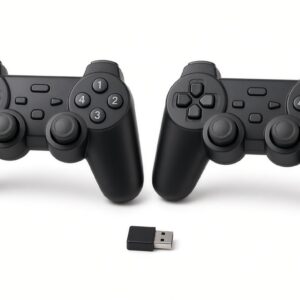
The Game Controllers for PC & Laptop use 2.4GHz wireless technology through a USB receiver, providing convenient cable-free gameplay. Each controller features dual analog sticks, directional controls and action buttons for precise movement and control across compatible games.
Enjoy wireless multiplayer gaming on your PC or laptop with this USB Twins 2.4GHz Wireless Controller set.
The pack includes two identical wireless gamepads and one USB receiver. Both controllers connect to the same small receiver, so you and a friend can play at the same time without extra dongles. 2.4GHz wireless technology gives a stable connection with no noticeable delay.Game Controllers for PC & Laptop has a dual vibration motors let you feel hits, crashes and explosions. Dual analog sticks and soft-touch buttons give comfortable control for long sessions.
Ideal for racing, fighting, sports and action games on Windows PCs and laptops.
What Are The Specifications?
- Connectivity: 2.4GHz wireless USB
- Vibration: Dual motor
- Analog sticks: Dual 3D analog
- Power: 2 × AAA batteries per controller
- Battery life: Over 10 hours
- Range: Up to about 10 metres
Key features
- 2.4GHz wireless – stable signal, no lag
- Twin pack: 2 controllers + 1 USB receiver
- Dual vibration / dual motor feedback
- Dual analog sticks (256-level 3D)
- Supports analog and digital modes
- Auto-connect with LED indicators
- Power-saving sleep mode (press START to wake)
- Vibration can be turned off (SELECT + R3)
- Soft-touch buttons, comfortable grip
- Works with multiple controller sets (up to 20 pairs / 40 pads claimed)
- Available in different colours
What’s in the box
- 2 × Wireless game controllers
- 1 × USB receiver (dongle)
- 1 × Driver disc
- Instruction sheet (inside the pack)
- Batteries not included. You need 4 AAA batteries in total (2 per pad).
How to connect (simple version)
- Plug the USB receiver into your PC or laptop.
- Insert AAA batteries into both controllers.
- The receiver LED will flash. Controllers connect automatically.
- First pad connects (LED slows down), then the second pad.
- When the LED becomes steady, both pads are ready.
- If vibration does not work, install the driver from the included disc.
Care notes
-
- Do not drop, hit or put heavy objects on the Game Controllers for PC & Laptop
- Do not get them wet or leave in direct sun
- Remove batteries if you will not use them for a long time or when power is low
- Do not clean with strong chemicals
Where Can I Buy Original USB Twins 2.4GHz Wireless Dual Vibration – Reliable -2- Game Controllers for PC & Laptop In Nigeria?
It is available on our website at: bluewonelectronics.com
Or visit our walk-in store at : 42 Olowu Street, Ikeja, Lagos

Reviews
There are no reviews yet.